Chrome
-
Download the
.zipfile and unzip the contents to a folder. -
Load in Chrome:
i. Open Chrome and type
chrome://extensionsin the address bar.ii. In the top right corner, toggle the switch to turn
Developer modeOn.iii. Click the
Load unpackedbutton that appears in the top left corner.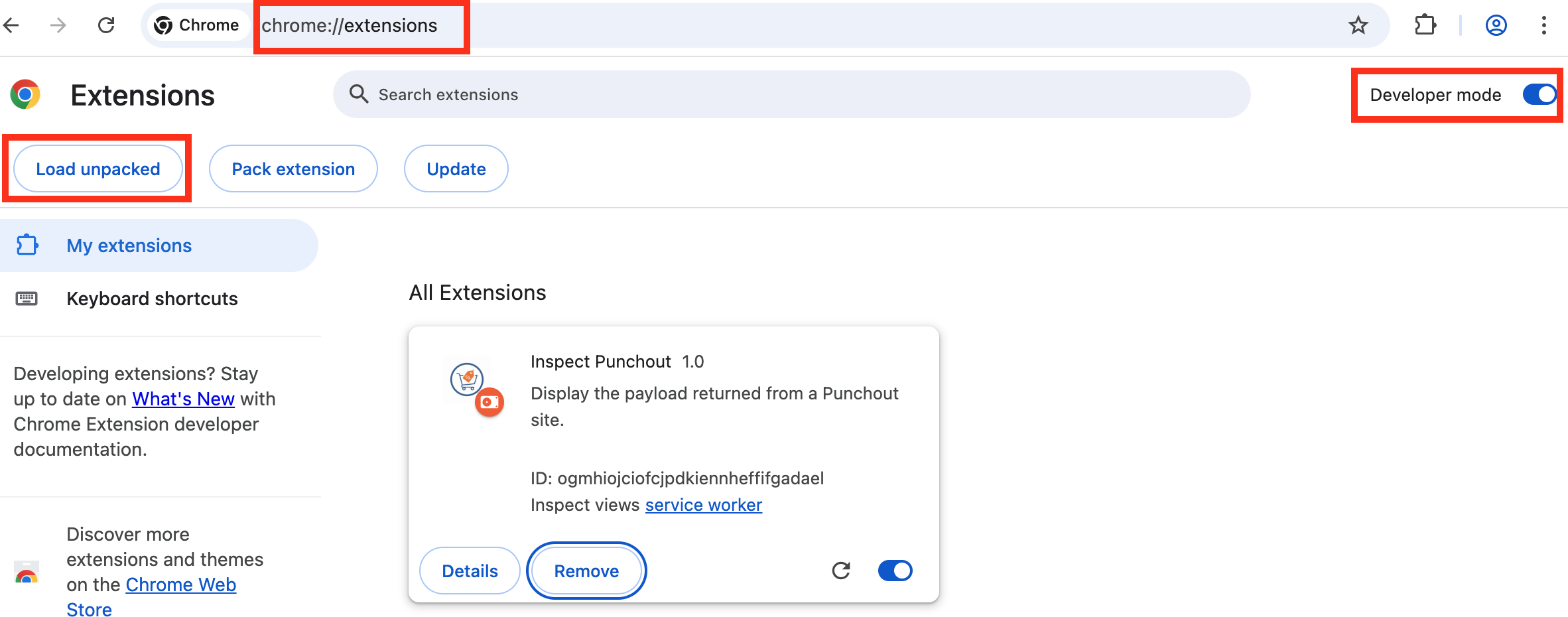
iv. In the file selection window, select the folder containing the unzipped extension (i.e, the folder that contains your
manifest.json, devtools.js, etc).v. You should now see a new entry under
All Extensionswith the nameInspect Punchout. -
Updating the Extension:
i. If you receive an update notification about a new version of the extension, download the update.
ii. Open Chrome and type
chrome://extensionsin the address bar.iii. Find the
Inspect Punchoutextension and click theRemoveicon.iv. Repeat the steps in
Load in Chrometo load the update.